library(tidyverse)
library(readxl)

path = "Excel/643 Shift Numbers by One Position.xlsx"
input = read_excel(path, range = "A1:A8")
test  = read_excel(path, range = "B1:B8")

shift_digits <- function(s) {
  split <- str_split(s, "(?<=\\d)(?=\\D)|(?<=\\D)(?=\\d)", simplify = TRUE)
  digit_idxs <- which(str_detect(split, "\\d"))

  if (length(digit_idxs) > 0) {
    shifted_digits <- split[digit_idxs] %>%
      {c(tail(., 1), head(., -1))}
    split[digit_idxs] <- shifted_digits
  }
  str_c(split, collapse = "")
}


result = input %>%
  mutate(answer = map_chr(Strings, shift_digits))

all.equal(result$answer, test$`Answer Expected`)
#> [1] TRUEExcel BI - Excel Challenge 643
excel-challenges
excel-formulas
🔰 Strings Answer Expected x7z8 x8z7 aa22bde345 aa345bde22 3he88TW5Xpf 5he3TW88Xpf abc5def 5625fsfhdg77a9b8
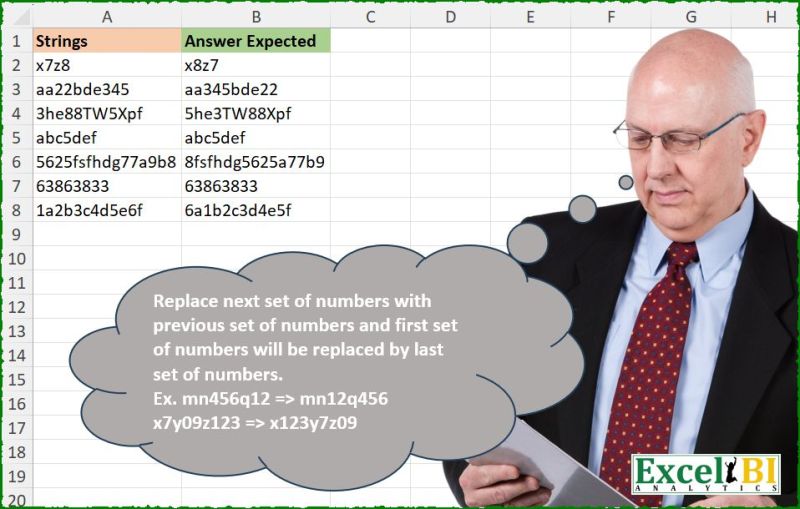
Challenge Description
🔰 Strings Answer Expected x7z8 x8z7 aa22bde345 aa345bde22 3he88TW5Xpf 5he3TW88Xpf abc5def 5625fsfhdg77a9b8
Solutions
- Logic: Read the workbook ranges needed for the challenge; Derive the required intermediate columns; Parse the packed text or string structure.
- Strengths: The code maps the workbook rule into a compact, reproducible pipeline.
- Areas for Improvement: The solution assumes the workbook layout and selected ranges remain stable, so any structural change in the sheet would require small adjustments.
- Gem: The elegant part is how little code is needed once the correct intermediate representation is chosen.
import pandas as pd
import re

path = "643 Shift Numbers by One Position.xlsx"
input = pd.read_excel(path, usecols="A", nrows=8)
test = pd.read_excel(path, usecols="B", nrows=8)

def shift_digits(s):
    split = re.split(r'(\d+|\D+)', s)
    split = [x for x in split if x]
    digit_idxs = [i for i, part in enumerate(split) if part.isdigit()]

    if digit_idxs:
        shifted_digits = [split[digit_idxs[-1]]] + [split[i] for i in digit_idxs[:-1]]
        for i, idx in enumerate(digit_idxs):
            split[idx] = shifted_digits[i]

    return ''.join(split)

input['answer'] = input.iloc[:, 0].apply(shift_digits)

print(input['answer'].equals(test['Answer Expected']))  #True
The Python version expresses the core extraction rule directly and keeps the pattern matching easy to review.
Difficulty Level
Easy / Medium
The business rule is clear, though the workbook still needs a few transformation steps to reach the expected output.